
 View full size ↗
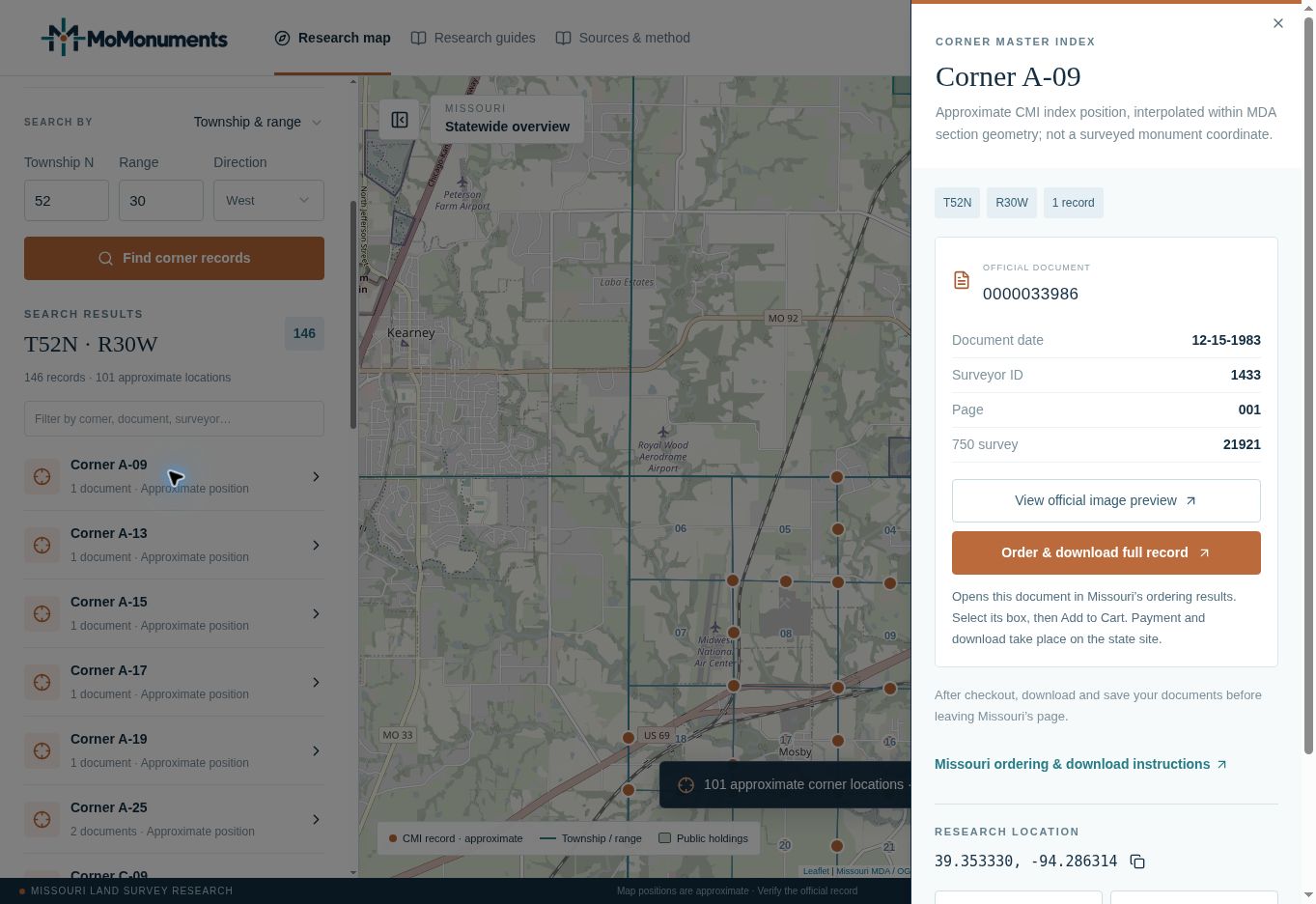
Use the right action on the record card
Select a corner result to open the document card. Read the number, page, date and surveyor before following a link. Several cards can belong to the same corner, so choose the filing that matches the work you are researching.
The full-record button opens the state site in a new tab with the document number supplied. It does not place an order or charge you. Keep the MoMonuments panel open so you can compare the reference.
| Action | What opens |
|---|---|
| View official image preview | The public image hosted by Missouri |
| Order & download full record | Missouri’s CMI results for that exact document number |
| Export research pins · KML | A file of approximate map locations, not monument documents |
Complete the download on Missouri’s site
- 01
Confirm the matching document.
Check the state result against the number on your MoMonuments card. A single document can appear in multiple index rows; review the cart so you understand what you are ordering.
- 02
Select the record and add it to the cart.
Use the checkbox beside the desired document and the state’s Add to Cart action. The state CMI and LSI share a shopping cart.
- 03
Review checkout.
Missouri handles its charges, purchaser information and payment. Check the state’s current total and instructions before authorizing anything.
- 04
Download and save before leaving.
After checkout, follow Missouri’s document download links. Its ordering guide says to save your documents before leaving the page. Retain the order number and receipt.
Check the saved document
Open the downloaded file and check that you have the intended filing and all required pages. Compare the township, range, corner designation and surveyor information with your project reference.
Use a filename that preserves the source number, then record the source and retrieval date in the project file. For example, a research note can include the CMI document number, its page, the legal reference and the order number. Do not treat a downloaded image’s filename as proof of its location.
If the preview opens but you still have no download
Return to the record card and choose Order & download full record. The image preview is a separate endpoint; opening it does not complete an order.
If the state page is unavailable, retain the document number and use the official Corner Master Index directly. For an order problem, Missouri’s help page lists landsurv@mda.mo.gov and (573) 368-2315; provide the order number and document name.
Official sources
Continue with the agency responsible for the data or documents. Read MoMonuments data sources and methods for how these layers are used on the map.